Opus
A Todoist clone with an AI layer, built to answer 'what should I do next?' instead of just 'what do I have to do?'
Opus, Todoist, and the Limits of the Classic To-Do App
I got Claude Code to build what Claude Opus 4.6 decided to call Opus (“Live by the Claude, Die by the Claude”).
Opus is an almost one-to-one clone of Todoist, Todoist being one of the primary and most well-beloved to-do list apps.
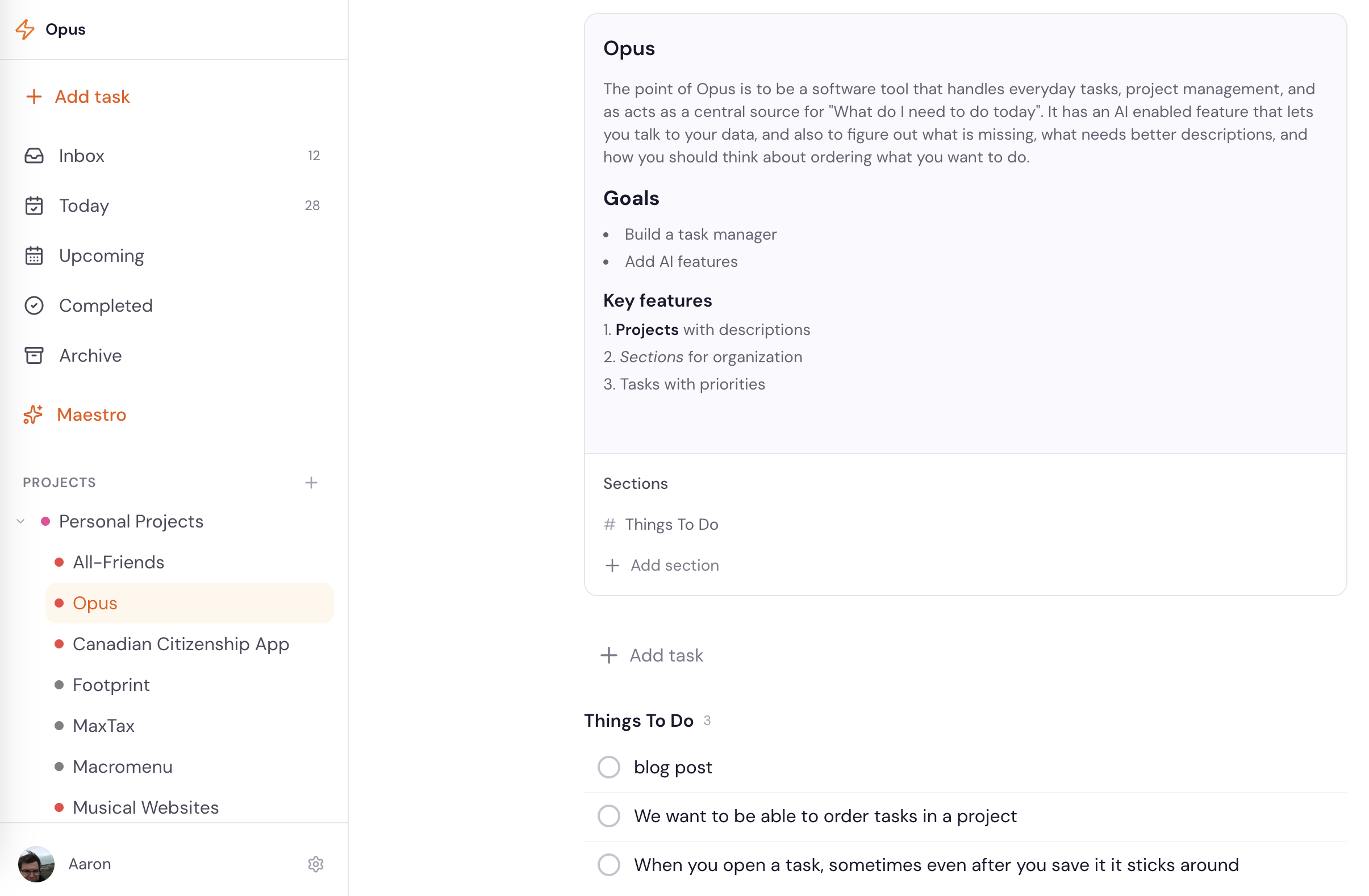
Let me talk about the history and some concepts about to-do list apps for a second.
To-Do List Apps
To-do list apps are traditionally the easiest apps to make, and are very much considered to be something you basically practice on in college to show: “okay, I can put everything together, I understand this framework.” In fact, sometimes they are even used as examples of how to use a framework and how to set things up (example: The Odin Project’s Javascript course and ToDoMVC).
Anyway, to-do list apps are not hard, no matter how you set them up. It is basically:
here is a database,
here is a user,
here are tasks associated with this user,
has the user clicked the task? yes or no.
Once you translate the pseudo-code into whatever your framework, boom you’ve got it.
Where it gets interesting and important is in the UI — specifically around the timing of tasks and the way they are visually shown to the user.
As we saw with the Friends app, having a nice spreadsheet is great when you want to know: “who do I need to talk to? Which one of my friends do I need to keep up with?” But it is nowhere near as powerful as having a dynamic calendar that lets you actually view when in a subsequent month you are actually going to need to see these friends. The calendar lets you plan much farther ahead, and also lets you see things in a way that really sticks with the human brain better than a list of reminders.
And so it goes with to-do lists.
The Optimized To-Do List
Believe it or not, the optimal to-do list app is not just a list of all the things you have to do. It is usually something a little more dynamic. This is one of the reasons why Todoist is so well loved by people who are really into productivity apps.
The first thing that Todoist has is “inboxing”. This is famously from GTD, or “Getting Things Done” by David Allen, but most productivity systems that are serious really hone in on this concept of the inbox- the place where you get information and details and pin them down before processing. In the idealized world, capturing things for your inbox is ever present: you are walking around the world, something comes up — write it down. You are getting an email and you cannot process it — write it down. You are in a meeting and trying to do something — write it down. You are in danger of forgetting something — write it down.
It is from this process of writing things down, putting them in your inbox, that you can then come back later and say: I did think about this. I do have these things. I can now think about when I am going to do them, what they actually mean, and what it takes to actually do this stuff.
As a result, Todoist is constantly optimizing its process — its apps — around making this kind of information gathering and task gathering easier.
You don’t stop with just getting things into your inbox and scheduling them. You have to process it: you have it scheduled, you put it into projects — basically you can categorize these tasks, order them, and move them around.
Now, that is where we start getting to the first sticking point: some tasks cannot be done until another task is done. Todoist, and most other productivity apps, do not enable if-then sequencing with tasks. You end up having to download an entire extension, like Ganttify, to enable this pattern. This is not something that is unclear or unknown. Users have asked for it, and the ToDoist team hasn’t prioritized.
So that sucks (but so it goes).
Limits of Projects
There are also a couple of limits around projects. On Todoist’s free tier, you can use five projects, which, if you do not have that many things going on, is fine. Or if you are leaving your tasks at a high level — maybe even treating your tasks themselves as projects — that is fine. You can just list them out.
But if you are trying to double-click and really see: okay, here are all the things I am able to do, and when they are going to be done — then it becomes difficult to actually manage those things.
Fernando (@zetalyrae) has an amazing essay about how they use ToDoist, “Notes on Managing ADHD”. They end up using 11 different projects, where they have five projects, but also five broader categories of tasks that get their own projects.
It gets worse:
Projects, too, are still a little underbaked. For example, one common feature request is: is there a way I can add context to a project? You want to be able to drop a file in, or just add a description. If you have something like “2027 February Valentine’s Day travel,” you are planning way, way ahead, but you also might forget by then what you were doing — precisely because you were trying to plan way, way ahead.
And note: planning way, way ahead is something these task manager apps and to-do list apps are really supposed to enable.
So where does this leave Todoist?
Todoist is a great app. It is basically the peak version of the app that you would make out of college, but it is still missing features that would make it more useful.
AI in To-Do Apps
Here I am going to get to the final thing that made me say: “okay, I need to talk to Claude about this.” AI integration in Todoist is underbaked.
In 2026, the biggest feature they are pushing out is a feature called Ramble, which is essentially: we will take an audio stream from the user, run it presumably through Whisper (Claude corrects me here- this is Gemini’s voice streaming API), and live-dictate that into Todoist’s to-dos. This goes back to the inboxing theory we discussed above.
The problem is that while this is maybe compelling as an experience, it solves the wrong problem. I’m never unsure of all the things I need to do. I’m unsure of which things to do.
The value add for AI in to-do apps and productivity is not “help me think of more things to think of.” It is: I have all of these things to do - “What is stupid? What should I prioritize? What do I need more details about?”
I currently do a version of this I call “the Ominous File of Contextual Knowledge Method” (The O’FOCK Method):
- Generate a list of all my todos organized as an outline, where the top level bullet is a project, and each subbullet is a task and a description of the project and the task in as much detail as I can
- Write dated deadlines on each task, or when I think a thing needs to be due
- Feed the entire document (in markdown) to Gemini Pro, with the prompt “where does this not make any sense? How would you prioritize next steps?”
- Answer those questions, reprompt, etc.
Why Opus Made Opus
Todoist does not offer that experience right now or anything close. In fact, I cannot really think of any apps that currently operate this way — certainly not the native Reminders app, and certainly not Tasks in Google.
So this readily becomes an available area where, if we just have enough features but also maintain a certain simplicity, we can start to say: “Claude can make this.”
With my experience going through my Claude code workflow, and with this vision specifically around organizing tasks into projects — which themselves have descriptions, which provide context to an AI — we can essentially create an AI layer over Todoist. We can recreate most of its features. And while there is some question around how much actual value there is in Todoist’s existing features, we can then expand on them at will.
And the result is Opus: a Todoist-like app where you bring your own Claude API, and where you can have actual conversations about what is on your to-do list, what is happening across your projects, what needs to be done, and how to solve those problems.